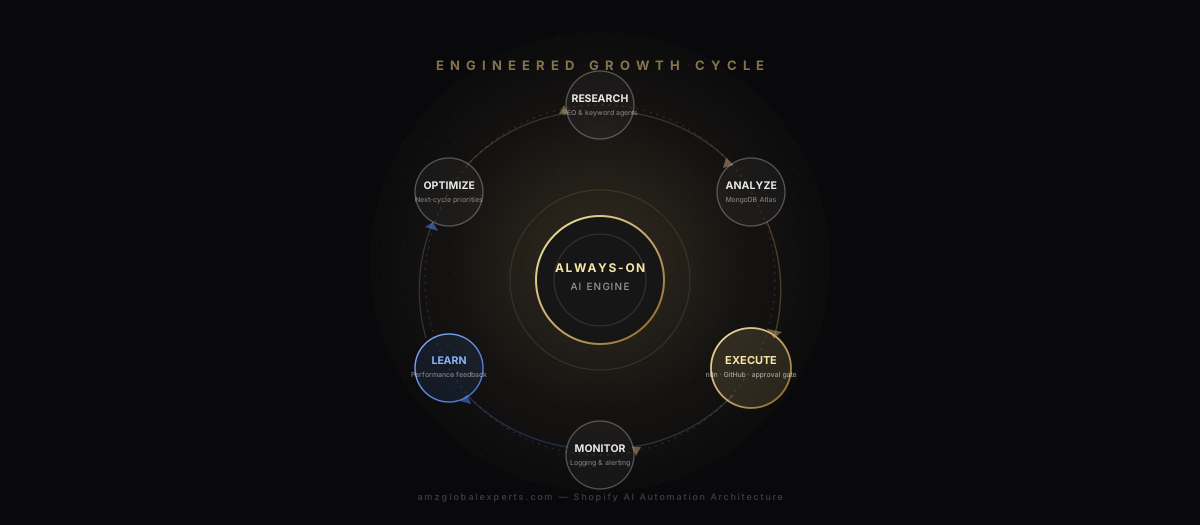
The question we hear underneath almost every Shopify automation inquiry isn't "can AI write my product descriptions." It's closer to: how do I actually build reliable AI automation for my store, not just a demo that breaks in production? That distinction matters more than it sounds. A workflow that runs cleanly in a screen-recorded walkthrough and a workflow that survives six months of real traffic, real API rate limits, and real edge cases are different engineering problems, and most of the content published about "AI agents for Shopify" only addresses the first one.
So this article states its thesis up front, because it shapes everything that follows: Shopify AI automation, done correctly, is not about generating content. Content — a product description, a meta tag, a blog draft — is one possible output of one stage in a much larger system. The system itself is a set of intelligent workflows that research, analyze, execute, monitor, learn, and optimize, continuously, with human approval and professional engineering controls wired into every stage. That cycle — not the model producing the words — is what turns SEO into organic traffic, traffic into engagement, engagement into conversion, and conversion into retained revenue. This piece goes deep on how that cycle is actually built: the orchestration, the version control, the logging, the security, the testing, the approval gates — the parts of the system that don't show up in a product demo but determine whether the automation survives contact with a live, revenue-generating store.
What Shopify Merchants and Developers Are Actually Asking
Shift the lens from marketing-focused Shopify communities to the more technical corners — r/shopify threads that get into the weeds, r/ecommerce posts from people who've actually built something, and the reliability-obsessed culture of r/devops and r/programming — and the questions change character. Merchants asking about traffic and conversion want to know if automation works. Developers and technically-minded operators asking about the same automation want to know if it fails safely.
The recurring theme with the most weight behind it is the fear of silent failure. A workflow that stops running — or worse, starts running incorrectly — with no alert firing anywhere is a pattern that shows up again and again in how technical operators describe their worst automation experiences. Not a dramatic outage, just a scheduled job that quietly stopped updating product metadata three weeks ago, discovered only when someone happens to check a page and notices it looks stale. The damage isn't the failure itself; it's the time between the failure and someone noticing.
Closely related is frustration with no version history when something breaks. A workflow gets modified — a field mapping changes, a condition gets adjusted — and when it starts producing wrong output two days later, there's no record of what changed, when, or who changed it. Reconstructing the "last known good" state becomes archaeology instead of a five-minute git diff, and that gap is exactly the kind of operational debt that engineering teams learned to eliminate for application code decades ago but that automation platforms, built for speed of setup rather than auditability, often skip entirely.
A third pattern is API rate-limit errors surfacing at the worst possible moment — a workflow hammering the Shopify Admin API during a flash sale or a traffic spike, hitting a throttle, and taking down a piece of the storefront's functionality exactly when order volume is highest and the cost of a broken checkout step is most expensive. Developers describe this less as a bug and more as a predictable consequence of treating an API integration as a fire-and-forget connection instead of a rate-budgeted resource that has to be managed deliberately.
The fourth and most consequential theme is a structural distrust of agents making unsupervised changes to a live store. This shows up as a recurring caution in technical discussions: don't grant broad write access to anything you haven't tested exhaustively, don't let an autonomous process touch pricing or inventory without a human checkpoint, and assume that any sufficiently complex automation will eventually attempt something you didn't anticipate. That's not a criticism of AI capability — it's the same caution a senior engineer applies to any automated system with write access to production, regardless of whether AI is involved at all.
The pattern underneath all four themes: the concern isn't whether AI is smart enough. It's whether the system around the AI was engineered to fail safely, stay auditable, and never outrun a human's ability to catch a mistake. That's an infrastructure question, not a model question.
The Engineered Growth Cycle: Research, Analyze, Execute, Monitor, Learn, Optimize
The complete growth cycle this architecture is built to run — SEO, organic traffic, engagement, marketing automation, conversion, customer retention, revenue — only compounds if the engineering underneath it treats each pass as a governed pipeline instead of a one-off script. The diagram below shows that pipeline as a closed loop, with the governance checkpoints marked explicitly rather than left implicit.
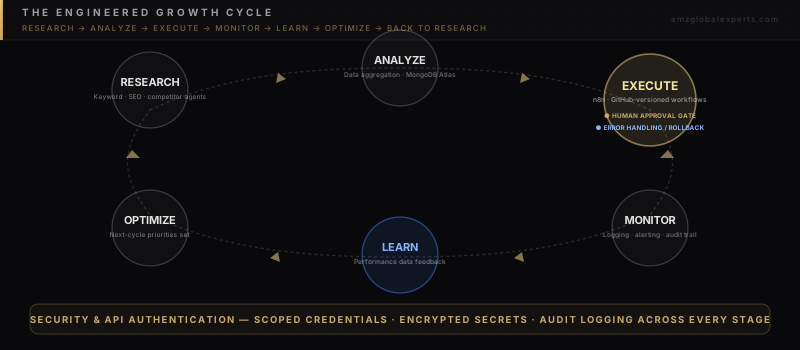
Research is where background agents run keyword research, SEO opportunity discovery, content planning, and competitor monitoring on a recurring schedule — the raw intelligence-gathering layer. Analyze aggregates that research alongside store and traffic data, typically into a document store like MongoDB Atlas, where it can be queried, compared against historical baselines, and prioritized. Execute is where an orchestration layer — commonly n8n — runs the actual workflow logic, defined in version-controlled configuration rather than ad hoc scripts, and routes every meaningful change through a human approval gate before it touches the live store, with error handling and rollback built in as a first-class part of the stage, not an afterthought. Monitor logs what happened and alerts on anomalies. Learn feeds the resulting performance data — did the change move traffic, engagement, or conversion — back into the system. Optimize uses that feedback to set priorities for the next Research pass, closing the loop. Security and API authentication run underneath every stage as a continuous band, not a step that happens once at setup.
The AI Agent Task Categories That Run Inside This Cycle
Each of the following is a defined, bounded task category — the kind of narrow, repeatable job a background agent is well suited to running continuously, feeding into the Research and Analyze stages of the cycle above.
Keyword Research and SEO Opportunity Discovery
An agent scanning search data on a schedule identifies terms a store isn't yet ranking for, tracks position movement on terms it is, and flags emerging category terms before competitors claim them. The output is a prioritized opportunity list, not a published change — this task category lives entirely in the Research stage.
Content Planning
Once opportunities are identified, an agent can map them against existing content — which terms already have a matching page, which need a new one, which are better served by a product page versus a blog or guide page — and produce a structured content calendar that a human then approves and sequences.
Product-Page Optimization
Agents audit existing product pages against target keywords and structural best practices, flagging thin content, duplicate boilerplate across variants, and missing structured data, then draft specific improvements for human review before anything publishes through the Execute stage.
Internal-Link Recommendations
As a catalog grows, internal linking decays — new products don't get linked from relevant collections, old links point to discontinued SKUs. An agent can map the current link graph and propose additions in bulk, which a person approves rather than reviewing link by link.
Competitor Monitoring
A background agent tracking competitor pricing, promotional cadence, and ranking movement on shared keywords surfaces meaningful shifts as alerts rather than raw data dumps — the kind of continuous watching that doesn't scale as a manual weekly task but is trivial for an agent running on a schedule.
Technical SEO Checks
Recurring automated audits catch broken canonical tags, missing alt text, slow-loading templates, and crawl errors — the technical hygiene work that quietly degrades a store's search performance if nobody's watching for it between quarterly audits.
Campaign Analysis
Agents pull performance data from marketing platforms and analytics on a schedule, surfacing which campaigns and content are actually driving qualified traffic versus which are generating impressions without engagement.
Customer Segmentation
Continuous re-segmentation based on purchase recency, category affinity, and engagement trend keeps marketing targeting current, rather than stale within a week of being built by hand — feeding the Analyze stage with a live customer picture instead of a quarterly snapshot.
Reporting
Instead of manually assembling a report from four platforms, the orchestration layer pulls traffic, conversion, and revenue data on a schedule and generates a standing report, with anomalies routed to alerts rather than buried in a dashboard nobody opens daily.
Conversion Optimization
Behavioral signals — scroll depth, cart abandonment patterns, product-page engagement — feed an agent that flags friction points and proposes specific, reversible interventions, which route through the same approval gate as every other customer-facing change.
Engineering Discipline: What Separates Reliable Automation from a Demo
This is the section that determines whether everything above survives contact with a real store. Twenty-five years of building and operating production IT systems teaches a lesson that applies directly here: the interesting engineering problem was never connecting to an API. It's making sure the system fails safely, keeps a record of what it did, and never outruns a human's ability to catch a mistake before a customer sees it. Each control below maps to a specific reliability concern raised by the technical communities discussed earlier.
Modular Workflow Architecture
A single monolithic workflow that handles keyword research, content drafting, publishing, and reporting in one unbroken chain is fragile — one failure anywhere breaks the whole thing, and debugging means tracing through every step to find where it went wrong. Modular architecture breaks the cycle into discrete, independently testable workflows — one for research, one for analysis, one for execution — connected through defined inputs and outputs. A failure in the reporting workflow doesn't take down the execution workflow. Each module can be modified, tested, and rolled back independently.
Version Control (GitHub)
Workflow definitions — n8n JSON exports, prompt templates, API mapping configurations — are text, which means they belong in GitHub exactly like application code. That gives every change a diffable history, a documented author and timestamp, and a pull-request review step before a workflow change reaches production. This directly answers the "no version history when something breaks" concern raised earlier: rolling back to the last known-good workflow state becomes a git command, not a reconstruction project built from memory.
Logging
Every workflow run — successful or failed — writes a structured log entry: what triggered it, what data it touched, what it changed, and how long it took. Without this, "what did the automation actually do at 3am on Tuesday" is an unanswerable question. With it, it's a query.
Monitoring and Alerting
Logging tells you what happened after the fact; monitoring tells you something's wrong while it's still fixable. A workflow that stops running, starts erroring at an elevated rate, or produces output outside expected bounds should trigger an alert to a person — not wait to be discovered when someone happens to notice a stale page. This is the direct engineering answer to the silent-failure fear that shows up most consistently in technical discussions of automation reliability.
Security
Credentials, API keys, and any customer data the system touches need to be handled with the same discipline as any production system: secrets stored encrypted and never committed to a repository in plaintext, access scoped to the people and services that actually need it, and a clear boundary around what data any given workflow is allowed to read or write.
API Authentication and Scoping
Every integration should request only the specific API scopes it needs — a workflow built for SEO metadata updates has no legitimate reason to request write access to customer records or payment information. Narrow scoping limits the blast radius if a credential is ever compromised and keeps an eventual audit of "what can this integration actually touch" a short conversation instead of a long one. Rate-limit handling belongs here too: an orchestration layer that queues, batches, and backs off intelligently is what prevents the API-throttle-during-a-flash-sale failure mode described earlier.
Error Handling
Every workflow step that calls an external API or touches store data needs an explicit failure path — what happens if the call times out, returns an unexpected shape, or the target record no longer exists. Unhandled errors don't just fail quietly; they can cascade, retry infinitely, or leave data in a half-updated state. Defined error handling means a failure stops cleanly, logs what happened, and alerts a person, rather than propagating.
Testing
Workflow logic should be tested against a staging theme or a duplicate product set before it ever touches the live store — the same discipline any software team applies before shipping to production. This includes deliberately testing edge cases: out-of-stock variants, duplicate webhook events, malformed API responses, and rate-limit conditions, not just the happy path that worked in the first demo run.
Documentation
Every workflow needs a written record of what it does, what it's allowed to touch, what triggers it, and who owns it. Undocumented automation becomes a liability the moment the person who built it is unavailable — a common and entirely preventable failure mode in small teams running increasingly complex automation stacks.
Human Approval Gates
The single most important control in the entire architecture. Every AI-drafted change that would touch the live store — content, metadata, pricing logic, customer-facing messaging — sits in a review queue until a person approves it. This is the direct engineering answer to the deepest concern raised in technical communities: distrust of agents making unsupervised changes to a live store. A good approval gate is a specific checklist — brand voice, factual accuracy, API scope, rollback readiness — not a vague "review before publish" step that gets rubber-stamped under time pressure.
Measurable KPIs
Task-completion counts and API-call volume describe activity, not results. The KPIs that actually matter tie back to the growth cycle: organic traffic and ranking movement on pages the system touched, workflow error and rollback rate over time, mean time to detect and resolve a failed automation, conversion and revenue movement against a control group, and the approval-versus-rejection ratio at the human gate, which is the clearest signal of whether agent output is genuinely improving over successive cycles.
| Control | Reliability Concern It Answers | What It Looks Like in Practice |
|---|---|---|
| Modular architecture | One failure taking down the whole system | Independently testable, independently rollback-able workflow units |
| GitHub version control | No history when something breaks | Diffable workflow history, PR review, git-based rollback |
| Logging | "What did it actually do?" | Structured log entry per run: trigger, data touched, outcome |
| Monitoring & alerting | Silent failure running for days unnoticed | Real-time alert on error rate or unexpected output |
| Security & scoped API auth | Blast radius of a compromised credential | Minimum necessary scopes, encrypted secrets, rate-limit handling |
| Error handling | Cascading failures from an unhandled edge case | Explicit failure path per external call, clean stop and alert |
| Testing | Works in the demo, breaks in production | Staging theme, duplicate product set, deliberate edge-case runs |
| Documentation | Automation nobody but its builder understands | Written scope, owner, and trigger for every workflow |
| Human approval gates | Unsupervised agent changes to a live store | Specific review checklist before any customer-facing change publishes |
| Measurable KPIs | Activity mistaken for results | Traffic, error rate, MTTR, conversion lift, approval ratio |
None of these controls are AI-specific. They're the same disciplines that separate reliable software from fragile software, applied to a system that happens to have an AI agent in the loop. The AI capability is table stakes at this point — what determines whether automation compounds into a real advantage or turns into a Reddit cautionary tale is whether it was built inside this kind of operating discipline from the start.
Strategic Recommendations
Short-Term — 0 to 30 Days
- Move existing (or planned) workflow definitions into a GitHub repository, even if the workflows themselves are simple — establish the version-control habit before complexity arrives.
- Stand up a staging theme or duplicate product set and require every new workflow to run there first, with deliberate edge-case testing before it touches the live store.
- Define, in writing, exactly which categories of change require a human approval gate before anything automated goes live — this document becomes the governance baseline every future agent gets built against.
Mid-Term — 30 to 90 Days
- Connect an orchestration layer (n8n or equivalent) to Shopify, an aggregated data store (MongoDB Atlas or comparable), and at least one analytics platform, with logging and alerting wired in from the start rather than bolted on later.
- Expand from a single pilot workflow — product-page metadata audits are a reasonable starting point — into two or three of the agent task categories described above, each modular and independently testable.
- Establish and deliberately test a rollback procedure: revert a change on purpose to confirm the process works before you need it under pressure.
Long-Term — 6 to 12 Months
- Build the full research-analyze-execute-monitor-learn-optimize loop as a closed system, with performance data from each cycle automatically informing the priorities of the next.
- Formalize measurable KPIs — traffic movement, error and rollback rate, MTTR, conversion lift against a control group, approval-versus-rejection ratio — into a standing report reviewed on a recurring cadence.
- Expand agent autonomy only in task categories that have proven reliable over a defined review period, never by default.
How AMZ Global Experts Helps
We bring more than 25 years of practical IT and systems-engineering experience to Shopify, Amazon, automation, and cloud technology — the same discipline that has always separated reliable infrastructure from fragile infrastructure, applied here to AI agent architecture instead of traditional software deployment. Our practice is built around n8n for orchestration, AWS for hosting and compute, GitHub for version control on every workflow definition, and MongoDB Atlas for the aggregated data layer that Research and Analyze stages depend on — governed throughout by human approval gates on anything that touches a live store.
This engineering-first approach is what differentiates a Shopify automation build that survives its first year from one that quietly stops working and nobody notices for a month. For the SEO and organic-traffic side of this system in practical, example-driven detail, see Shopify AI Automation: How AI Agents Can Boost SEO, Traffic and Conversions. For the marketing-automation and human-in-the-loop framework governing everything downstream of traffic, see AI Agents for Shopify: Automating SEO and Digital Marketing for More Traffic and Sales. And for how this entire architecture connects to conversion and attributed revenue — the pillar piece in this cluster — see AI-Powered E-Commerce Automation: How Shopify AI Agents Turn SEO Traffic Into Sales. For the same orchestration-and-approval-gate pattern applied to marketplace operations, our guide to automating Amazon operations with n8n, AI workflows and AWS is a useful companion, and our AI-powered development guide covers how this same engineering discipline applies to building the systems themselves, not just running them.
Conclusion
The Shopify brands getting durable results from AI automation aren't the ones with the most sophisticated model. They're the ones who treated the automation as an engineering system from day one — modular, version-controlled, logged, monitored, tested, and gated behind human approval — rather than a collection of connected API calls that happened to work in a first demo. That distinction is the actual differentiator, and it's the one most content about "AI agents for Shopify" skips entirely in favor of the more exciting question of what the AI can produce.
If you're evaluating what a properly engineered Shopify AI automation build actually requires for your store — the orchestration, the version control, the monitoring, the approval gates — book a growth strategy session and we'll map the architecture against your current stack.