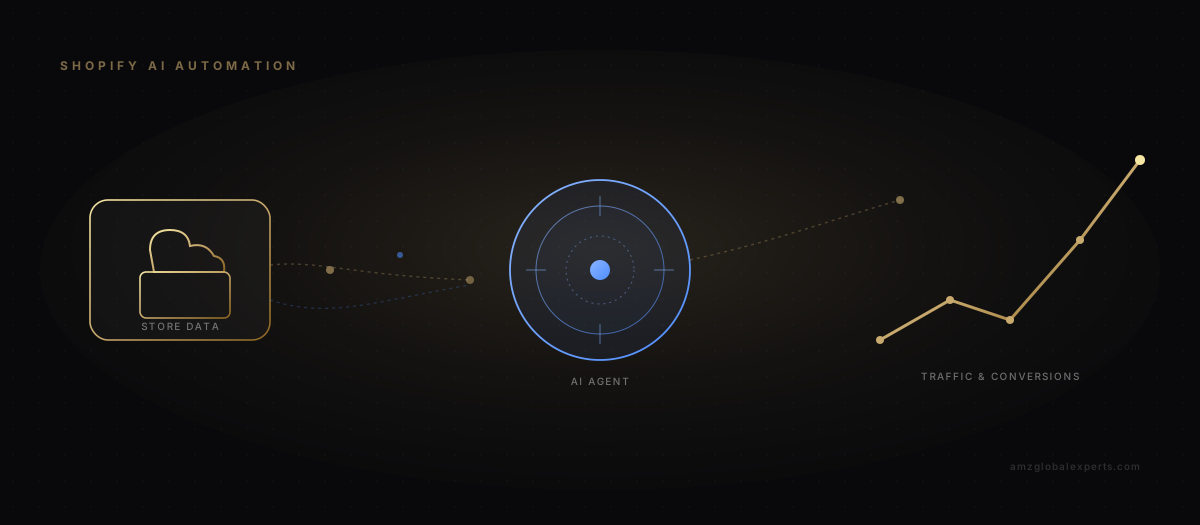
That's the question we hear most from Shopify merchants once their catalog crosses a few hundred SKUs: how do I keep every product page optimized, every meta description current, and every competitor move accounted for, without hiring a full internal marketing team or losing a week every quarter to manual re-optimization? A second, closely related question follows immediately. How do I connect Shopify to automation tools without something breaking on a live store during checkout on a Saturday night?
Both questions have real answers, and neither answer is "just install more apps." AI agents running in the background — connected to Shopify through an orchestration layer, governed by human review, and measured against actual revenue outcomes — can absorb a meaningful share of the SEO research, content optimization, competitor monitoring and reporting work that currently eats operator time. What determines whether that automation helps or hurts the store? The engineering discipline wrapped around it.
What Shopify Merchants Are Actually Asking
Spend time in the Shopify, ecommerce and SEO communities where store owners trade notes, and a handful of themes surface again and again — not as isolated complaints, but as a consistent pattern in how merchants think about AI and automation right now.
The first is distrust of generic AI-generated product copy. Merchants have tried the obvious move: feeding a product name into a general-purpose chatbot and pasting the output into a description field. The result reads exactly like what it is: interchangeable, keyword-stuffed, and indistinguishable from a hundred other listings using the same tool the same way. That experience has made a lot of store owners skeptical of "AI content" as a category, even when the underlying idea (using AI to speed up research and drafting) is sound.
The second theme is sheer fatigue with manual re-optimization at scale. A merchant who adds seasonal variants, updates pricing, or restructures a collection quickly discovers that dozens or hundreds of product pages now have outdated titles, meta descriptions, or internal links pointing to the wrong place. Fixing that by hand, page by page, isn't a task anyone budgeted time for.
The third is a preference for alerts over dashboards. Store owners running lean teams don't want another analytics tool to check daily. They want to be told when something needs attention — a keyword ranking dropped, a competitor undercut a price, stock is running low on a top-converting SKU. Otherwise, leave them alone.
The fourth, and probably the most consequential, is fear of automation silently breaking something on a live store. A misconfigured workflow that overwrites a handle, strips a redirect, or pushes a bad price update in the middle of a sales event isn't a hypothetical to merchants who've heard about it happening to someone else's store. That fear is rational. It's the exact reason a production-grade automation system is built around review gates and rollback, not just API connections.
A fifth, quieter theme shows up less often in a single complaint and more as a recurring subtext across threads: uncertainty about where to even start. Merchants can see that AI and automation are supposed to help. But the gap between "install an app" and "run a governed system that touches SEO, content and marketing at once" feels wide. Most of the content written about it skips straight from consumer-grade AI writing tools to enterprise case studies, with no middle step described. That gap is exactly where a disciplined implementation earns its keep.
The pattern underneath all five themes is the same: merchants don't want less control, they want less repetitive manual labor. The systems worth building give them both.
How the Workflow Actually Fits Together
The architecture that answers all four concerns at once looks less like a single AI tool and more like a pipeline, with a human checkpoint built into the middle of it rather than bolted on as an afterthought.
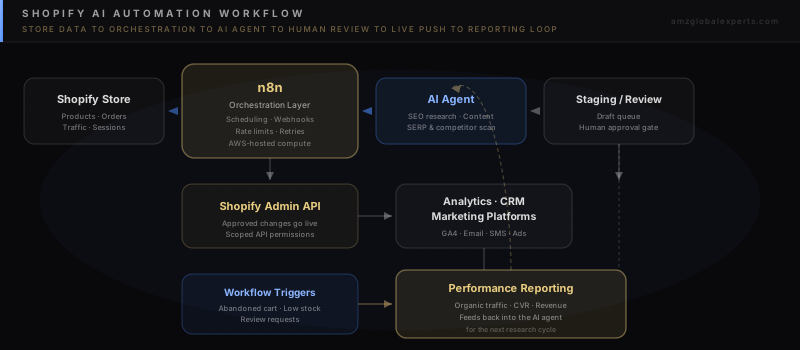
Shopify store data — products, orders, traffic patterns — flows into an orchestration layer, most commonly n8n, which can run self-hosted on AWS or a comparable cloud environment. That layer schedules jobs, manages retries, and respects the Shopify API's rate limits, so the automation never behaves like a hostile request pattern against the store's own backend. From there, tasks route to an AI agent configured for a specific job — SEO research, content drafting, competitor monitoring — which produces recommendations or drafts, not live changes. Those drafts sit in a staging or review queue, where a person approves, edits, or rejects them before anything reaches the Shopify Admin API. Once approved, changes go live. The resulting performance data flows into analytics, CRM and marketing platforms, then loops back into the AI agent's next research cycle, so each pass is informed by what actually happened, not just what was predicted.
Real-World Applications
Automated SEO Research and Keyword Monitoring
An agent can run scheduled keyword-position checks, flag ranking drops or gains beyond a defined threshold, and surface emerging search terms in a merchant's category before a competitor claims them. This is exactly the kind of task that benefits from running continuously in the background rather than being checked manually once a month. The value is in catching movement early, not in the check itself. A well-configured agent also separates transactional keyword opportunities from informational ones, so the recommendations it hands off feed the right destination: a product page for buy-intent terms, a blog or guide page for research-stage terms. Not every keyword forced into a product listing where it doesn't belong.
AI-Assisted Product-Page Content Optimization
Rather than rewriting product descriptions from scratch, an agent can audit existing pages against target keywords, identify thin or duplicate content across variants, and produce structured draft improvements — updated titles, meta descriptions, alt text, and body copy — that a human editor reviews against brand voice before publishing. This is where the difference between "AI automation" and "AI content spam" gets decided. The agent does the research and structuring. A person makes the judgment call. For catalogs with dozens of near-identical variants — different colors, sizes, or bundle configurations of the same core product — an agent is particularly useful at spotting where thin, duplicated boilerplate is quietly suppressing every variant's ranking. That's a pattern that's tedious to catch manually across hundreds of URLs, but trivial for an agent running a scheduled audit.
Competitor and SERP Monitoring
Agents can track competitor pricing, promotional cadence, and ranking positions for shared target keywords, and summarize meaningful shifts instead of raw data dumps. Combined with SERP feature tracking — who owns the featured snippet, who's showing up in AI Overviews for a given query — this gives a merchant the alert-driven visibility the community consistently says it wants, instead of another dashboard to check. The same monitoring loop can watch for a competitor launching a new variant, dropping a price below a defined threshold, or picking up new backlinks. It routes only the changes that cross a meaningful threshold to a human, rather than a constant stream of noise that eventually gets ignored.
Internal Linking Automation
As a catalog grows, internal linking tends to rot. New products don't get linked from relevant collection or blog pages, and old links point to discontinued SKUs. An agent can map the current link graph, identify high-opportunity linking gaps between related products and content, and propose additions that a person approves in bulk rather than one page at a time. This matters more for Shopify stores than it first appears. Without a strong internal link structure, new or updated pages can sit for weeks before search engines fully discover and index them. An automated linking pass shortens that discovery window meaningfully.
Digital Marketing Workflow Triggers
This is where Shopify automation extends past SEO into revenue-adjacent operations: abandoned-cart sequences triggered by cart events, low-stock alerts routed to purchasing before a bestseller goes dark, and review-request flows triggered by delivery confirmation rather than a fixed timer. None of this requires an AI agent specifically. But layering an agent on top lets the triggers get smarter over time. It can adjust the timing or offer in an abandoned-cart flow based on what's actually converted for similar carts, or hold back a review request until a delivery-tracking event confirms the package genuinely arrived, rather than firing on a blind timer that catches customers before the product is even in their hands.
Automated Performance Reporting
Instead of manually assembling a monthly report from four different platforms, the orchestration layer can pull organic traffic, conversion rate, and revenue data on a schedule and generate a standing report. Or better: route only the anomalies and wins into an alert, with the full report available on demand. This closes the loop described in the diagram above. The same data that proves (or disproves) a change's value becomes the input for the AI agent's next research pass. So a page that got a content refresh three weeks ago and hasn't moved in rankings becomes a signal to try a different approach, not a page that quietly falls off everyone's radar.
Governance and Measurement
None of the applications above are safe to run unsupervised on a production store. The governance layer isn't optional overhead. It's the actual product. Twenty-five years of building and operating production systems teaches a simple lesson that applies directly here: the interesting engineering problem was never connecting an API. It's making sure the automation fails safely, logs what it did, and never outruns a human's ability to catch a mistake before a customer sees it.
| Control | What It Does | Why It Matters |
|---|---|---|
| Human review gate | Every AI-drafted change — copy, metadata, pricing logic — sits in a queue for approval before publish | Removes the single biggest fear merchants raise: automation silently changing a live store |
| Staging environment | Workflow logic and content changes are tested against a duplicate theme or product set first | Catches broken logic before it reaches real customers |
| Scoped API permissions | Each integration requests only the specific Shopify Admin API scopes it needs | Limits the blast radius if a workflow or credential is ever compromised |
| Rate-limit handling | Orchestration layer respects Shopify's API call limits with backoff and retry logic | Prevents throttling or account-level API restrictions |
| Data privacy | Customer PII is excluded from workflows that don't require it; access is documented where it is required | Reduces exposure and keeps the system auditable |
| Monitoring and rollback | Every automated change is logged with a clear path to revert it | Turns "something broke" into a five-minute fix instead of a crisis |
Measuring ROI, Not Activity
The number of tasks an agent completed or pages it touched is not a result — it's a description of effort. The metrics that actually matter are organic traffic growth on the specific pages the automation optimized, conversion rate movement on those same pages, and revenue attributable to the change over a defined window, ideally compared against a control group of untouched pages so the lift can be attributed with some confidence rather than assumed. A reporting loop that surfaces vanity counts (workflows run, emails sent, pages scanned) without connecting them to those three outcomes is measuring the wrong thing.
In practice this means resisting the temptation to report automation success the way a software vendor reports usage — "X pages optimized this month" — and instead reporting it the way a growth operator reports a channel: what happened to organic sessions on the affected pages, what happened to their conversion rate, and what that's worth in revenue terms once ordinary seasonal and traffic variance is accounted for. A workflow that touched two hundred pages and moved nothing is worse than a workflow that touched twenty pages and lifted revenue on eight of them, and a reporting system built around activity counts will happily present the first outcome as the bigger win.
API Scopes and Rate Limits in Practice
Shopify's Admin API enforces call limits per store, and every workflow that reads or writes catalog, order, or customer data needs to operate inside that budget without starving other integrations already running against the same store — POS, fulfillment apps, existing marketing tools. An orchestration layer that queues, batches, and backs off intelligently keeps automation from becoming the thing that throttles a merchant's other systems. Scopes matter just as much as limits: a workflow built for SEO metadata updates has no reason to request write access to customer records or payment information, and requesting only what's needed keeps the eventual audit of "what can this integration actually touch" a short conversation instead of a long one.
Strategic Recommendations
Short-Term — 0 to 30 Days
- Audit current Shopify Admin API access and tighten scopes to the minimum required for existing integrations.
- Stand up a staging theme or duplicate product set to test automation workflows safely before they touch the live store.
- Pick one narrow, high-volume task — product-page metadata audits are a good starting point — and run it as a pilot with a mandatory human review step.
Mid-Term — 30 to 90 Days
- Connect an orchestration layer (n8n or equivalent) to Shopify, analytics, and at least one marketing platform so triggers and reporting stop living in separate silos.
- Expand the AI agent's scope to competitor and SERP monitoring, with alert thresholds tuned to reduce noise rather than maximize notification volume.
- Establish a rollback procedure and test it deliberately — revert a change on purpose to confirm the process works before you need it under pressure.
Long-Term — 6 to 12 Months
- Automate internal linking recommendations across the full catalog, with quarterly bulk-approval cycles rather than per-page manual review.
- Build a standing ROI report that ties every major automated workflow back to organic traffic, conversion rate, and revenue — not task counts.
- Extend workflow triggers into retention and lifecycle marketing (review requests, replenishment reminders, win-back flows) informed by the same performance loop feeding the SEO agent.
How AMZ Global Experts Helps
We've spent more than 25 years building and operating production IT systems before turning that same discipline toward ecommerce growth — which is why our approach to Shopify AI automation looks less like a marketing experiment and more like a piece of infrastructure: staged environments, scoped permissions, monitored rollouts, and a review process that treats AI output as a draft, not a publish button. We design the orchestration layer, configure the AI agents for SEO research and content optimization, and build the reporting loop that ties the whole system back to organic traffic, conversion rate, and revenue — the outcomes that actually matter to a Shopify brand's bottom line.
That engineering background is also why we tend to start smaller than most automation pitches suggest. A single well-governed workflow — product-page metadata optimization with a human review step, for instance — proves the pattern on a live store before it expands into competitor monitoring, internal linking, and marketing triggers. The sequencing matters as much as the technology: brands that try to automate everything in the first month are the ones most likely to end up as the cautionary story someone else references on Reddit.
For merchants running Shopify alongside Amazon or other marketplaces, this same orchestration pattern extends naturally — see our breakdown of automating Amazon operations with n8n, AI workflows and AWS for the marketplace side of the same architecture, and our guide to AI-powered development with agents, GitHub, AWS and MongoDB for how the underlying engineering discipline applies to building these systems well. If your store's foundation needs work before automation makes sense, our Shopify agency audit versus Shopify SEO audit guide and our forensic Shopify UX and CRO audit are useful starting points.
Conclusion
AI agents can absorb the repetitive, continuous work of Shopify SEO and marketing automation — research, monitoring, drafting, reporting — freeing operators to focus on judgment calls the automation shouldn't make alone. The merchants getting real traffic and conversion lift from this shift aren't the ones who bolted an AI tool onto their store overnight; they're the ones who built the review gates, the staging environment, and the measurement discipline first, then let the automation run inside that structure. That's the difference between automation that compounds and automation that eventually breaks something you have to explain to a customer.
If you're evaluating what a disciplined Shopify AI automation build actually looks like for your store, book a growth strategy session and we'll map the workflow against your current stack.