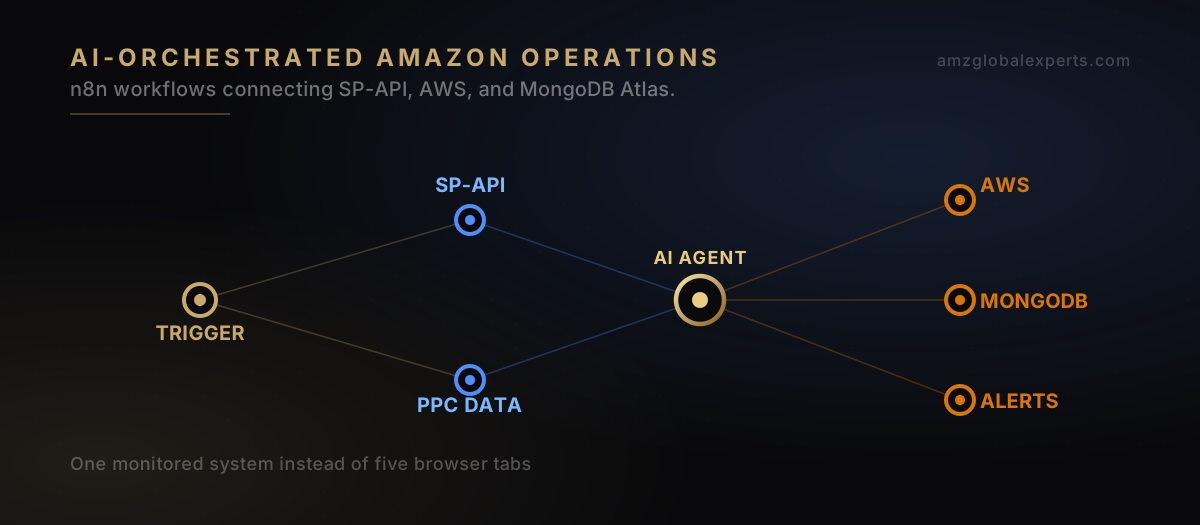
If you sell on Amazon at any real volume, the question isn't whether automation belongs in your operation. It's why you're still opening five browser tabs every morning to check inventory levels, PPC spend, and competitor pricing by hand. The search behind this article is usually one of a few variations: can AI agents actually run parts of my Amazon operations, how do I stop manually checking dashboards every day, or what's a reliable way to automate Amazon seller tasks that doesn't break the moment Amazon changes something. We'll answer all three directly, built around n8n as the orchestration layer that ties Amazon's Selling Partner API, AI models, and your existing business systems into one coherent, monitored system.
Most sellers who go looking for "Amazon automation" land on either point-solution apps that automate one narrow task, or no-code tools that break silently the moment an API schema shifts or a rate limit gets hit. n8n sits in a different spot entirely: it's an open-source, self-hostable workflow engine that can call the Amazon SP-API, route data through an AI model, write to a real database, and notify a human before anything risky happens — all inside one auditable pipeline. This guide covers how that architecture actually works, what production discipline it takes, and what to build first.
What Amazon Sellers Are Actually Asking in Automation Communities
Spend time in Amazon seller and automation communities — r/AmazonFBA, r/AmazonSeller, r/n8n, r/automation — and a handful of themes surface again and again. None of these are exact quotes; they are patterns that show up consistently enough to be worth naming directly.
The most common complaint is brittleness. Sellers describe building a Zapier chain or a low-code automation that worked fine for a few weeks, then quietly stopped. No error, no alert, just a gap in the data nobody noticed until a stockout or a missed PPC anomaly made it obvious. What people actually fear isn't "the automation breaks." It's "the automation breaks and nothing tells me."
A second recurring thread is frustration with Amazon's own API behavior — SP-API rate limits, throttling on report requests, inconsistent response times that make naive polling unreliable. People who've tried building their own scripts against SP-API without retry logic or backoff routinely hit the same wall: works fine in testing, then falls over under real production load.
A third theme: a clear preference for alerts over dashboards. Sellers who've lived through dashboard fatigue consistently say they want to be told when something needs attention, not stare at a screen hoping they notice the anomaly themselves. That's one of the strongest arguments for event-driven automation over static reporting.
The fourth theme, and honestly the most important one for anyone building serious automation, is distrust of fully autonomous pricing or inventory changes. Even sellers who are genuinely excited about AI tooling stay cautious about letting a model push live price changes or commit inventory decisions without a human checkpoint. That's a reasonable instinct. It should shape how any production system gets designed. Not something to engineer around.
The pattern underneath all four complaints is the same: these are not tooling problems, they are engineering discipline problems. A workflow without retry logic, monitoring, and a human checkpoint on high-risk actions will eventually fail — regardless of which platform it runs on.
The Architecture: n8n as the Orchestration Layer
The core idea is pretty simple. Really. n8n sits in the middle of your Amazon operation as the orchestration layer — the system that schedules jobs, calls the SP-API, routes data to an AI model when judgment is needed, writes results to a persistent data store, and decides whether an action can proceed automatically or needs a human to sign off first.
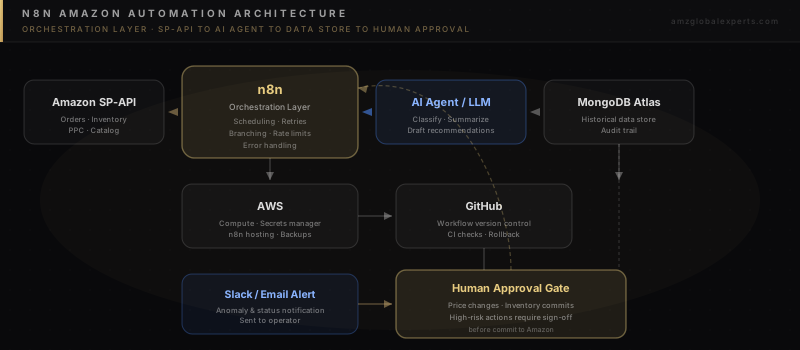
Each piece in that diagram has a specific job. SP-API is the source of truth for orders, inventory, advertising, and catalog data. n8n handles scheduling, branching logic, rate-limit management, and retries. The AI agent step — usually a call to a large language model — handles the parts of the workflow that need judgment: summarizing a competitor price shift, drafting a listing variant, flagging an anomaly worth a human's attention. MongoDB Atlas stores the historical record, so today's automation run has context from last week's, and so you've got an audit trail if something needs review later. AWS provides the compute that keeps n8n running reliably around the clock, plus the secrets management that keeps API credentials out of your workflow code. GitHub version-controls the workflows themselves, so a change to a live automation is a reviewable diff, not an untracked edit made directly in a production UI. And the human approval gate is the last checkpoint before anything with real financial consequence — a price change, an inventory commitment, a bid override — actually executes.
Real-World Amazon Automation Workflows
The architecture above only matters in the context of specific workflows. Here's what it looks like applied to the tasks that actually eat up a seller's time.
Sales and Performance Reporting
Instead of manually pulling Seller Central reports, a scheduled n8n workflow calls SP-API on a fixed cadence, normalizes the data, and writes it to MongoDB Atlas. A downstream step compares today's numbers against a rolling baseline and only sends a notification when something's actually worth looking at — a meaningful sales swing, a conversion rate drop, a stock level crossing a threshold. That replaces a daily dashboard check with a system that only interrupts you when it actually matters.
Inventory Alerts
Inventory workflows pull FBA stock levels and sell-through velocity, calculate days-of-cover per SKU, and trigger alerts before a stockout happens, not after. The AI step can draft a reorder recommendation with quantity and timing reasoning attached, but the actual purchase order commitment still routes through the human approval gate we described above.
Competitor Monitoring
A workflow scrapes or queries competitor pricing and Buy Box status on a schedule, stores the history in MongoDB Atlas so trends are visible over time, and uses an AI step that explains what changed and why it might matter. Not a raw table a human still has to sit there and interpret.
PPC Data Collection and Anomaly Detection
Advertising data pulled from SP-API feeds a workflow flagging campaigns with ACOS drift, wasted spend on non-converting search terms, or budget exhaustion earlier in the day than usual. This is a strong candidate for the alert-over-dashboard pattern the automation community keeps asking for, and it pairs naturally with the intent-mapping and bid-logic approach covered in our Amazon PPC playbook on intent mapping and AI bid logic.
Product Research
Research workflows pull category, review, and pricing data on a schedule and use an AI step to synthesize the findings into a short brief instead of a raw export. Useful for ongoing competitive intelligence, or for evaluating new SKUs before you commit catalog resources to them.
Listing Workflows
AI-assisted listing workflows draft title, bullet, and description variants based on current catalog and keyword data, then route the draft to a human for review before it publishes. Never publishing directly — a listing change touches live conversion performance, so it shouldn't skip the human step.
Data Synchronization
Where a brand runs Amazon alongside Shopify, a CRM, or an ERP, n8n workflows keep inventory, order, and customer data synced across systems, instead of relying on manual exports or one-off scripts nobody maintains once the person who wrote them leaves.
Automated Notifications
Every workflow above ends in some form of notification — Slack, email, or an internal dashboard update — built around the principle the seller community keeps repeating: tell me when something needs my attention, don't make me go look for it.
Production Best Practices
Building a workflow that runs once in a demo takes a totally different discipline than building one that runs unattended for a year. This is where most DIY Amazon automation efforts fall short, and it's the part of the job that looks a lot more like traditional software engineering than no-code tinkering.
Version Control
Workflows should get exported and tracked in GitHub, not edited only inside a live n8n instance. That gives you a reviewable change history, the ability to roll back a bad edit, and a record of who changed what and why — the same discipline any production codebase needs.
Modular Architecture
Break large workflows into smaller, reusable sub-workflows instead of one enormous chain. A modular design means a failure in one piece — say, the PPC data pull — doesn't take down inventory alerting, and it means you can test and update individual pieces independently.
Security and Least-Privilege Access
API keys and credentials belong in a secrets manager — AWS Secrets Manager or equivalent — not hardcoded into workflow nodes. Each credential should carry the minimum scope it needs. A read-only reporting integration shouldn't hold write access to pricing or inventory endpoints.
Error Handling and Retry Logic
Every SP-API call should assume it can fail or get rate-limited, and the workflow should retry with backoff instead of failing silently. Dedicated error-handling branches should route failures to an alert channel immediately, not let them disappear into a log nobody checks.
Monitoring and Alerting
Critical workflows need a health check — a separate process confirming the automation actually ran and produced expected output, not just that it didn't throw a visible error. This directly addresses the "it broke and nothing told me" failure mode that comes up constantly in seller automation discussions.
Backups and Data Integrity
MongoDB Atlas backups should run on a schedule independent of the automation itself, so a bad workflow run can't corrupt your only copy of historical performance data.
API Rate-Limit Management
SP-API enforces rate limits per endpoint. Production workflows should throttle request pacing deliberately instead of firing requests as fast as possible and hoping for the best — the single most common cause of automation that "worked in testing" and then fails under real load.
Human Approval Gates for High-Risk Actions
Price changes, inventory commitments, and any action with direct revenue exposure should stop at a human checkpoint before executing. That's not a limitation of the automation. It's the design decision that makes the system trustworthy enough to actually rely on.
| Practice | Why It Matters | Where It Breaks Without It |
|---|---|---|
| Version control (GitHub) | Reviewable, reversible workflow changes | Untracked live edits cause untraceable regressions |
| Modular design | Isolates failures to one workflow segment | One broken node takes down unrelated automations |
| Least-privilege credentials | Limits blast radius of a leaked key | A single compromised key can touch pricing or inventory |
| Retry logic with backoff | Survives SP-API throttling gracefully | Rate-limit errors cause silent data gaps |
| Monitoring / health checks | Confirms workflows actually ran correctly | Failures go unnoticed for days |
| Human approval gates | Keeps financial risk under human control | An AI error can commit a bad price or stock change live |
Why This Requires Real Engineering Discipline
There's a real difference between an automation demo — five nodes, one happy-path test run, a screenshot — and a system running unattended in production for a year without someone quietly babysitting it. That difference is exactly what more than 25 years of IT and software engineering experience brings to Amazon automation work: designing for failure modes before they happen, building retry and monitoring logic as a default instead of an afterthought, and treating API credentials and data pipelines with the same security posture as any enterprise system, because that's genuinely what they are. Amazon automation that holds up under real operating conditions is a software engineering problem wearing an ecommerce costume. It should be built by people who've already spent decades solving software engineering problems.
Strategic Recommendations
Short-Term (0–30 Days)
- Identify the two or three manual tasks costing the most hours weekly — usually reporting checks, inventory monitoring, or PPC review — and prototype a single n8n workflow for the highest-value one.
- Move API credentials out of any hardcoded location and into a proper secrets manager before building further automation on top of them.
- Set up basic alerting (Slack or email) for at least one workflow so you can validate the "tell me, don't make me look" pattern before scaling it.
Mid-Term (30–90 Days)
- Introduce MongoDB Atlas as a persistent data layer once you have more than one workflow that benefits from historical context or shared state.
- Add retry logic, error-handling branches, and health-check monitoring to every workflow touching SP-API directly.
- Move workflow definitions into GitHub version control and establish a review step before any change reaches production.
Long-Term (6–12 Months)
- Build out AI-assisted workflows for listing optimization, competitor synthesis, and product research, with human approval gates on anything that publishes or commits.
- Formalize a human-in-the-loop approval process for pricing and inventory actions so AI recommendations are consistently fast to review, not a bottleneck.
- Treat the automation system itself as a product with an owner, a change log, and a maintenance cadence — not a one-time project.
How AMZ Global Experts Helps
We build n8n-based automation systems for Amazon brands that need more than a demo — SP-API integration, AI-assisted decision workflows, AWS infrastructure, MongoDB Atlas data layers, and the security, monitoring, and human approval controls that make a system trustworthy enough to run unattended. This work sits alongside the strategic and growth work covered in our guides on proven Amazon growth strategies and building a complete Amazon growth strategy, and complements the broader AI tooling discussed in our piece on proprietary AI tools for e-commerce productivity. Decades of software engineering discipline combined with hands-on Amazon marketplace expertise — that's what separates automation that survives contact with production from automation that looks good in a demo and quietly fails three weeks later.
Conclusion
Automating Amazon operations isn't about replacing judgment with AI. It's about building a system disciplined enough to handle the repetitive, monitorable work automatically while keeping a human firmly in control of anything with real financial consequence. n8n is the orchestration layer that makes this practical: it connects SP-API, AI models, AWS, MongoDB Atlas, and GitHub into one auditable system instead of a pile of disconnected scripts. The sellers who get the most out of this approach aren't chasing full autonomy. They're building for reliability first and letting the automation earn trust one well-monitored workflow at a time.
If you are ready to move from manual dashboard-checking to a monitored, production-grade automation system built around your Amazon operation, book a strategy session with AMZ Global Experts to map the workflows worth building first.