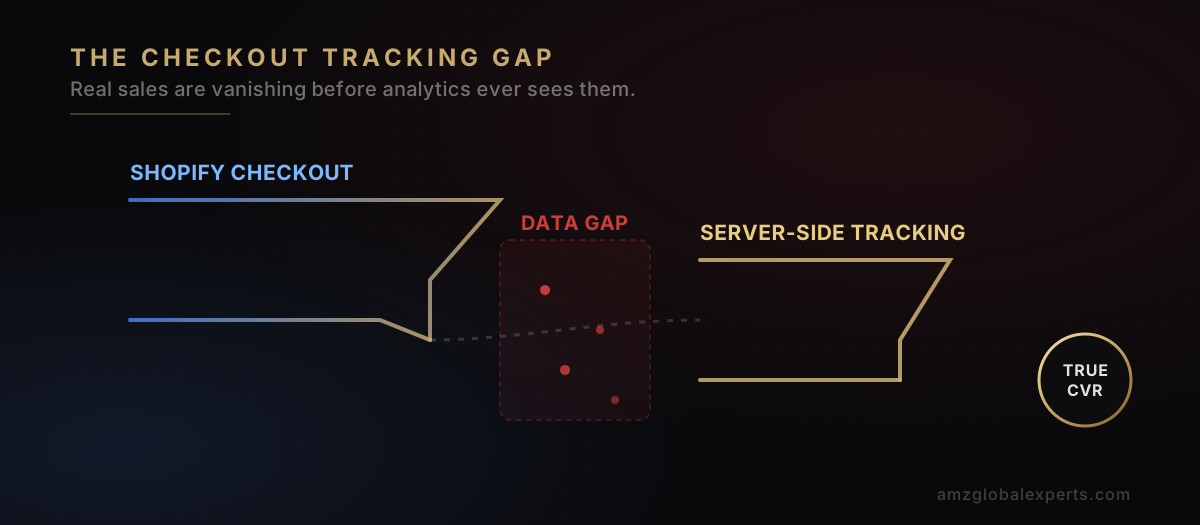
If you run a Shopify store and your dashboard has told you conversion rate is collapsing while traffic keeps climbing, you are not alone, and honestly, you very likely don't have a demand problem. Threads in the Shopify Community and merchant forums describe the identical symptom over and over: sessions up, reported sales down, checkout apparently the point of failure — and Shopify support's standard advice (check abandoned carts, review shipping rates, audit discount codes) fixes nothing, because the problem isn't the store. It's what's being measured.
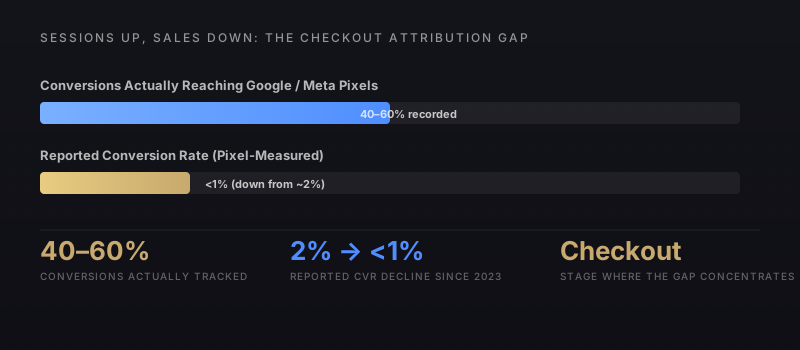
The pattern merchants are actually describing is a conversion tracking gap, not a conversion rate gap. Only 40–60% of real conversions are reaching Google and Meta's ad platforms as recorded events. Your actual sales might be flat or even growing while your reported conversion rate reads as roughly half of what it used to be. Half your purchases are simply invisible to the pixels you're using to measure them.
Why the Tracking Gap Exists
Browser privacy features block client-side pixels
Safari's Intelligent Tracking Prevention and Firefox's Enhanced Tracking Protection now restrict or delete third-party cookies and limit how long client-side pixels can attribute a conversion back to an ad click. A meaningful share of traffic, disproportionately on mobile Safari, which represents a large share of Shopify's traffic base, simply never fires a trackable event, even though the purchase completes normally.
Ad blockers and consent banners remove the pixel before it fires
Ad-blocking browser extensions block Meta Pixel and Google Ads tag requests outright. Separately, cookie-consent banners required under GDPR and similar frameworks mean a share of shoppers explicitly opt out of tracking cookies before the pixel ever loads. And that opt-out rate has climbed year over year as consent-management platforms have gotten more prevalent and more aggressively worded.
Checkout extensibility changed where and when scripts execute
Shopify's move to checkout extensibility restructured when third-party scripts are permitted to run relative to order completion. Stores that migrated tracking scripts without re-validating firing order against the new checkout flow are silently under-recording conversions happening in that new checkout timing window, a change many merchants haven't audited for because the storefront otherwise looks and functions identically.
How to Audit Your Store for the Gap
Before changing anything, quantify the gap. Pull Shopify's own Orders count for a fixed date range, then compare it against the "Purchase" conversion count in GA4 and the "Purchase" event count in Meta Ads Manager for the identical range. A discrepancy larger than 15–20% isn't normal statistical noise. It's a tracking failure, and the size of the gap tells you roughly how much of your reported CRO and paid-media performance data is currently unreliable.
Next, check whether your store is running client-side-only tracking (a Pixel or gtag snippet firing in the browser) or has server-side tracking layered on top. Client-side-only is the setup almost universally affected by this gap. It's also, unfortunately, still the default and most common Shopify tracking configuration.
How to Fix It
Implement server-side conversion tracking
Meta's Conversions API and Google's GA4 Measurement Protocol let you send order data directly from Shopify's backend to the ad platform, independent of whether the customer's browser ever fired a client-side pixel. This is the single highest-leverage fix. It recovers conversions lost to ad blockers, ITP/ETP restrictions, and consent opt-outs simultaneously, because none of those obstacles exist on a server-to-server data path.
Deduplicate client-side and server-side events
Once server-side tracking is live, both the client-side pixel and the server event may fire for the same order. Implement event deduplication (using Shopify's checkout token or order ID as the shared event ID) so the platform counts each conversion once, not twice. An inflated conversion count is just as misleading as a deflated one.
Re-validate script firing order after any checkout extensibility change
Any time you update checkout customizations, re-run the audit comparing Shopify Orders to platform-recorded conversions for a sample week. Checkout-stage tracking is uniquely fragile to platform migrations, and catching a regression within a week is far cheaper than catching it three months into a paid-media budget decision built on bad data.
The core insight: A falling conversion rate reported by your ad platforms doesn't necessarily mean fewer customers are buying. It may mean fewer purchases are being counted — and every media-buying decision made against that undercounted number is being made on incomplete information.
Why This Matters Beyond the Dashboard
The tracking gap doesn't just distort a vanity metric. Every automated bidding algorithm on Meta and Google Ads optimizes toward the conversion signal it receives. If that signal represents only half of actual purchases, the algorithm is optimizing against an incomplete picture of what's actually working, potentially suppressing spend on campaigns that are genuinely profitable, simply because their true conversion volume stays invisible to the platform making the bidding decisions. Fixing the tracking gap isn't just a reporting exercise. It's a direct lever on how efficiently your ad budget gets allocated. Real money, real impact.
Frequently Asked Questions
In most cases this is a tracking and attribution problem, not a genuine demand drop. Merchants across Shopify Community and seller forums report only 40-60% of actual conversions getting sent to Google and Meta pixels, which makes reported conversion rate look like it collapsed even when real sales held steady or grew.
The gap concentrates at checkout, where browser privacy restrictions (Safari ITP, Firefox ETP), ad blockers, consent-banner opt-outs, and third-party cookie deprecation prevent client-side pixels from firing reliably. Shopify's checkout extensibility changes have also shifted where and when tracking scripts execute relative to order completion.
Compare Shopify's own Orders count against Google Analytics 4 and Meta Ads Manager conversion counts for the same date range. A gap larger than 15-20% signals a tracking issue, not normal discrepancy. Then check whether server-side tracking (Conversions API, GA4 Measurement Protocol) is implemented, since client-side-only tracking is the primary point of failure.
Implement server-side conversion tracking via Meta's Conversions API and GA4's Measurement Protocol, so order data gets sent directly from Shopify's backend instead of relying solely on browser-side pixels. This recovers conversions lost to ad blockers, ITP/ETP restrictions, and consent opt-outs, and typically restores 20-40 percentage points of previously unrecorded conversions.