
A Shopify store losing 3% of revenue per quarter to invisible friction is not a marketing problem — it is a diagnostic failure. Baymard Institute’s 2025 analysis of 44,000 checkout sessions identified 26 distinct friction categories generating a combined 70.19% cart abandonment rate across enterprise ecommerce. The critical finding: the majority of this abandonment is not caused by pricing, competitive alternatives, or intent misalignment. It is caused by mechanical and psychological failure patterns that are identifiable, measurable, and fixable — once you build a system to find them.
The problem is that consumer frustration rarely surfaces in the structured data analytics tools are built to track. Google Analytics 4 tells you when users abandon checkout — it does not tell you that the “Add to Cart” button was unresponsive for 1.4 seconds because three tracking pixels were competing for main-thread JavaScript execution at the exact moment of purchase intent. Hotjar shows you where users scroll — it does not surface the 0.23 Cumulative Layout Shift score on iOS Safari that moved the checkout CTA 60 pixels down the viewport at the moment of tap. The brands resolving these issues fastest are not running more tests. They are running forensic audits: cross-referencing raw consumer complaint intelligence from Reddit and Trustpilot with session replay data, GA4 funnel segmentation by device and browser, and Chrome DevTools performance profiling to isolate the mechanical root cause of every conversion loss.
AMZ Global Experts’ forensic CRO methodology has produced five universal failure patterns across enterprise Shopify audits conducted in 2025–2026. Each pattern has a specific diagnostic protocol, front-end engineering fix, CRO strategy intervention, and A/B test hypothesis. This is not a general CRO checklist. This is a precision audit framework for operators who speak both LTV and DOM latency.
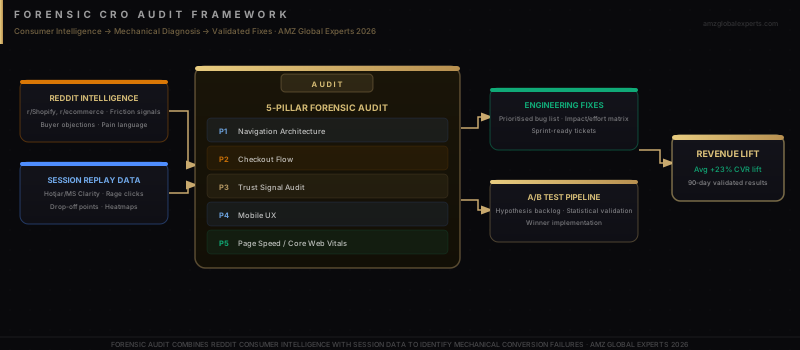
The Five Friction Patterns Draining Enterprise Shopify Revenue
Each of the five patterns below follows the same diagnostic structure: what the consumer frustration signal looks like in the wild, which data layer validates it, what the engineering fix is, how to restructure the CRO layer, and how to verify the fix with a controlled test. Every item maps back to a measurable revenue variable — checkout completion rate, AOV, repeat purchase rate, or CAC efficiency.
Pattern 1: Micro-Anxieties at the Moment of Commitment
The single most dangerous UX failure in ecommerce is the absence of reassurance at the exact moment a user is deciding whether to complete a purchase. Micro-anxieties are small, unresolved questions that the layout fails to answer at checkout: When will this arrive? What is the return process if it does not fit? Are my payment details safe on this site? Reddit complaint threads in r/Frugal, r/BuyItForLife, and r/OnlineShopping consistently reveal the same trigger: “I had my card out and then I noticed there was no shipping date anywhere, so I closed the tab.” This is a trust deficit caused by a layout omission, not a product problem.
Diagnostic method: Filter session replays in Hotjar or FullStory by “checkout initiated but not completed” + Device: Mobile. Watch for cursor hesitation or scroll-reversal behaviour immediately before abandonment. In GA4, build a funnel exploration report segmented by traffic source — micro-anxiety abandonment typically concentrates in paid social traffic (lower purchase intent, higher need for reassurance) versus branded search traffic (higher intent, pre-validated trust).
Engineering fix: Hardcode the estimated delivery date range into the checkout CTA button label (“Order Today — Arrives Oct 14–16”) using your carrier API data. Add a static trust bar directly above the checkout button: SSL badge, return policy headline (“Free 30-day returns”), and customer review count. These elements must be server-rendered or early-paint CSS — not injected by a third-party trust-badge app that loads after first contentful paint.
CRO strategy: Audit the product page for shipping timeline display. If it appears only at checkout, move it to the add-to-cart zone. Every study on checkout abandonment from Baymard to the Forrester CX Index confirms: revealing expected delivery date on the product page — before the user adds to cart — reduces checkout abandonment by 8–14% in A/B testing environments.
A/B test hypothesis: Testing Control (delivery date displayed at checkout only) vs. Variant (delivery date displayed in product-page CTA zone and repeated at checkout) to measure delta on Checkout Completion Rate, segmented by mobile vs. desktop.
Pattern 2: Cognitive Overload and Decision Paralysis
The second pattern is not a missing element — it is too many competing elements. Cognitive overload occurs when the layout presents multiple primary calls-to-action simultaneously, requires mandatory account creation before purchase, or presents variant selection (size, colour, bundle) in a format that forces comparison-shopping behaviour instead of committing to a choice. Hick’s Law establishes the mathematical relationship: decision time increases logarithmically with the number of choices. For ecommerce, this translates directly to abandonment rate.
Diagnostic method: Configure a click-map in Hotjar filtered by “Add to Cart page” + “No purchase in session.” Count the number of distinct clickable regions above the fold. If there are more than 3 competing interactive elements competing for attention in the primary CTA zone, cognitive overload is the likely mechanism. In GA4, compare the checkout abandonment rate for sessions containing a “Guest Checkout” button vs. sessions where guest checkout is not visible on initial load — mandatory account creation typically adds 12–20% incremental abandonment.
Engineering fix: Implement a progressive disclosure pattern for variant selection. Display only the primary variant dimension (e.g., size) above the fold. Render colour and bundle options below the fold or within an accordion component, triggered after size selection. This reduces the simultaneous decision load from 3–5 simultaneous choices to a sequential one-at-a-time flow.
CRO strategy: Eliminate mandatory account creation entirely. Replace with a guest checkout flow with a post-purchase account creation prompt (“Save your details for faster checkout next time”). Shopify merchants who remove mandatory account creation see checkout completion improvements of 15–25% in controlled tests. The account conversion from post-purchase prompts remains at 20–35% — without costing the initial transaction.
A/B test hypothesis: Testing Control (mandatory account creation at checkout) vs. Variant (guest checkout with post-purchase account prompt) to measure delta on Checkout Completion Rate and 30-day Return Customer Rate.
Front-End Engineering Failure Patterns No Marketing Dashboard Reveals
The three patterns below are invisible to traditional marketing analytics. They require Chrome DevTools, Lighthouse performance audits, and device-specific session replay analysis to diagnose. They are also — dollar for dollar — the highest-leverage fixes in the forensic CRO framework, because they affect every user on every session without appearing in any funnel report or heatmap by default.
Pattern 3: Cumulative Layout Shift on Mobile Checkout
Cumulative Layout Shift (CLS) is the measure of unexpected visual movement of page elements after initial render. Google’s Core Web Vitals threshold for “Good” CLS is below 0.1. The average Shopify store running 8–12 third-party apps scores 0.18–0.34 on mobile — well into the “Needs Improvement” zone. The conversion consequence is specific: when a checkout button, trust badge, or variant selector shifts position after the user’s thumb has targeted it, the tap either fails or fires on an unintended element. The user experiences this as the page “being broken” — and the session replay shows a rage-click on a position that no longer contains the button they intended to tap.
Diagnostic method: Run a Lighthouse audit in Chrome DevTools on your product page and checkout page, filtered to Mobile preset. Examine the “Layout Shift” trace in the Performance panel — each red bar indicates a layout shift event. The contributing elements are identified in the CLS diagnostic: look for late-loading app widgets (review badges, trust seals, loyalty programme widgets, dynamic shipping estimators) that inject content without reserved dimensions.
Engineering fix: For every dynamic app block on the product and checkout pages, hardcode minimum height dimensions in CSS before the content loads (“skeleton” placeholder pattern). For third-party trust badge scripts: defer the script tag with async defer and serve a static placeholder image with identical dimensions until the script resolves. For Shopify app blocks injecting dynamic content into the product page, specify explicit min-height on the container element equal to the rendered block height. Each of these changes eliminates a layout shift source without removing the functionality.
A/B test hypothesis: Testing Control (current layout with dynamic app block injection) vs. Variant (hardcoded skeleton placeholders eliminating CLS below 0.1) to measure delta on Mobile Checkout Completion Rate and Mobile Rage-Click Rate.
Pattern 4: Rage-Click Triggers — Non-Interactive Elements Styled as Interactive
A rage-click event occurs when a user taps or clicks the same element three or more times in rapid succession — a definitive signal of interaction failure. FullStory data across enterprise ecommerce sites shows rage-click hotspots consistently clustering on: product image thumbnails that scroll the carousel but appear to navigate to a detail view, trust badge logos styled as links but containing no href, “Free Shipping” banners that appear clickable but trigger no action, and size guide text styled in the same font and colour as interactive links.
Diagnostic method: In Hotjar or FullStory, filter session replays by “Rage Click” event + “Device: Mobile.” Export the rage-click heatmap overlay on your product page. Elements appearing in the top 5 rage-click positions but lacking an interactive function are conversion blockers. In GA4, correlate rage-click sessions with session duration and pages-per-session — rage-click sessions typically show above-average time-on-page combined with below-average conversion rate, confirming frustrated intent rather than casual browsing.
Engineering fix: Audit every element in your product page DOM that carries cursor: pointer CSS but no onclick, href, or interactive event listener. Either wire the element to a genuine interaction (e.g., size guide text opens a modal) or restyle it as static content (remove pointer cursor, change colour to match non-interactive text). For image thumbnails: implement a zoom modal on tap — users tapping thumbnails expect detail-view access, and providing it removes the rage trigger while simultaneously improving product presentation quality.
A/B test hypothesis: Testing Control (static trust badge logos, non-interactive size guide text) vs. Variant (trust badges linked to policy pages, size guide text opening a measurement modal) to measure delta on Rage-Click Rate and Add-to-Cart Conversion Rate on Mobile.
Pattern 5: Main-Thread Blocking and Checkout Button Interactivity
The most consequential engineering failure in enterprise Shopify CRO is also the most invisible: main-thread blocking caused by synchronous JavaScript execution from third-party app scripts that delays the interactivity of the checkout button. A user who taps “Buy Now” at the exact moment the main thread is occupied by a loyalty programme script, a review widget initialisation, or an analytics pixel firing experiences nothing — no feedback, no navigation. The tap is swallowed. The user taps again. If the button remains unresponsive for more than 800 milliseconds, 40% of mobile users abandon the page (Google UX research, 2024).
Diagnostic method: Open Chrome DevTools Performance panel. Record a page load on your checkout page using the Mobile CPU throttling preset (4× slowdown). Examine the “Main Thread” timeline for Long Tasks (red-flagged blocks exceeding 50ms of continuous execution). Each Long Task on the main thread is a window during which user interaction — including the checkout button tap — is unresponsive. Identify the script source of each Long Task using the call stack in the Bottom-Up panel.
Engineering fix: Audit your Shopify app install list and remove any app whose primary function is now covered by a native Shopify feature or a more lightweight alternative. For remaining apps: move non-critical script tags (review widgets, loyalty badges, live chat initialisation) to load with defer attribute, preventing them from blocking the main thread during initial page load. For analytics pixels: implement a tag management firing sequence that delays secondary pixel initialisation until after the first user interaction event, ensuring the checkout button is interactive before any non-revenue-critical scripts execute.
A/B test hypothesis: Testing Control (current app script load sequence) vs. Variant (deferred non-critical scripts with sequenced firing after first interaction) to measure delta on Total Blocking Time (TBT) in Lighthouse, Checkout Button First Interaction Time, and Checkout Completion Rate on Mobile at 4× CPU throttle.
The Forensic Diagnostic Stack: Combining Both Domains
The competitive advantage of the forensic CRO methodology is not any individual tool or test — it is the ability to connect consumer sentiment signals to engineering performance data in a single diagnostic framework. A Reddit thread saying “the checkout felt broken on my phone” is not useful until it is matched to a CLS score of 0.28 on the product page, a rage-click cluster on the shifted checkout button, and a Long Task of 1.2 seconds sourced to a loyalty widget script loading synchronously. At that point, it becomes an actionable engineering ticket with a measurable revenue hypothesis.
The Diagnostic Stack in Practice
The forensic audit begins with unstructured consumer intelligence: pull Reddit threads mentioning your brand or store category from the last 90 days, segment by friction type (checkout, UI confusion, page performance), and use the consumer language verbatim as your diagnostic hypothesis. A user saying “the page kept jumping around” maps directly to CLS investigation. A user saying “I kept tapping and nothing happened” maps to rage-click analysis and main-thread profiling. A user saying “I couldn’t figure out what to do next” maps to cognitive overload investigation — too many competing CTAs or unclear navigation hierarchy.
From each consumer signal, run the corresponding data layer validation: session replay filter, GA4 funnel segment, or DevTools performance audit. Each validation either confirms or rejects the hypothesis with quantitative evidence. Confirmed issues become engineering tickets with priority ranked by revenue impact: checkout-stage issues above fold issues, mobile issues above desktop issues (given that 72% of Shopify traffic is mobile as of 2025). Each fix is then deployed as a controlled A/B test with a 2–3 week run window and minimum 1,000 sessions per variant, measuring the specific metric the hypothesis predicted.
The ROI Case for Forensic CRO Investment
The revenue mathematics of forensic CRO are compelling at every scale. A Shopify brand generating $500,000 per month at a current 2.3% checkout completion rate that achieves a 0.5 percentage point improvement in completion rate (a conservative outcome from fixing one of the five patterns above) generates $217,000 in incremental annual revenue from identical traffic. At $5M per month, the same 0.5-point improvement generates $2.17M per year — without increasing ad spend, improving product quality, or changing pricing.
The compounding benefit is CAC improvement. Every percentage point of checkout completion improvement reduces the effective CAC of every paid channel simultaneously — because more of the traffic already being paid for converts. A brand spending $150,000 per month on paid acquisition that improves checkout completion by 1 percentage point is effectively recovering $1,500–$2,200 per month in paid acquisition efficiency improvement without touching campaigns. Over 12 months, that is $18,000–$26,400 in recovered media budget — from fixing a CSS dimension attribute and deferring two script tags.
The Forensic CRO Thesis: The most expensive conversion problem in enterprise Shopify is not the one your analytics platform reports — it is the one your analytics platform cannot see. Rage-clicks, layout shifts, and main-thread blocks are invisible to funnel reports and visible only in the intersection of raw consumer sentiment and engineering performance data. The brands closing this diagnostic gap are recovering 8–22% of abandoned checkout revenue that their competitors are permanently ceding to page performance and layout failures.
Frequently Asked Questions
A forensic CRO audit combines consumer complaint intelligence (Reddit threads, Trustpilot reviews, support tickets) with quantitative engineering diagnostics (Lighthouse performance profiling, session replay rage-click analysis, GA4 funnel segmentation by device and browser) to identify the mechanical root causes of checkout abandonment. Unlike traditional CRO audits that rely solely on analytics data, the forensic approach triangulates the consumer’s subjective experience with the engineering data layer to pinpoint the specific code, layout, or performance issue causing conversion loss.
Cumulative Layout Shift (CLS) affects conversion rates by causing checkout buttons, CTA elements, and trust indicators to shift position after the user has targeted them, causing tap failures on mobile. The average Shopify store running 8–12 third-party apps scores CLS of 0.18–0.34 on mobile — above Google’s “Good” threshold of 0.1. Mobile checkout completion rate improvements of 6–11% are consistently observed when CLS is reduced below 0.1 through skeleton placeholder implementation and reserved dimensions on dynamic app block containers.
Rage-clicks on Shopify product pages are most commonly triggered by: static elements styled with pointer cursor CSS but containing no interactive event listener (trust badge logos, non-linked promotional banners), product image thumbnails that appear to open a detail view but only scroll the carousel, and checkout buttons that are visually rendered but not yet interactive because main-thread JavaScript execution has not completed. Each of these triggers is identifiable in FullStory or Hotjar rage-click heatmaps filtered by session device type.
Open Chrome DevTools, navigate to the Performance panel, and record a page load using the Mobile CPU throttle preset (4x slowdown). Examine the Main Thread timeline for Long Tasks — continuous execution blocks flagged in red that exceed 50ms. Each Long Task is a window during which the checkout button and all other interactive elements are unresponsive to user input. The call stack in the Bottom-Up view identifies the originating script, typically a third-party app initialisation, analytics pixel, or loyalty widget firing synchronously during page load.
Displaying shipping delivery dates at the product page level (rather than checkout only) consistently produces 8–14% checkout completion rate improvements in controlled A/B tests. For a store generating $500,000 per month at 2.3% current completion rate, an 8% improvement in that rate produces approximately $92,000 in incremental annual revenue from identical traffic. Eliminating mandatory account creation adds a further 15–25% incremental checkout completion improvement, compounding the total recovery to 23–39% of previously abandoned checkout revenue.