
Most software tools are built like administrative forms. Clunky. Noisy. They force the creator to think like a machine. When AI-assisted coding arrived, the developer community got very excited about something called vibe coding: loose, careless sentences typed into an editor, magic expected to appear. Go to the honest corners of r/cursor and r/webdev today and you find a completely different story. Unguided AI assistants lose their minds. They introduce elegant-looking junk that breaks entire architectures. Regression after regression. Refactor sessions that leave the codebase worse than before.
Vibe coding is a compromise. It is a distraction. And at AMZ Global Experts, we don’t believe in compromises.
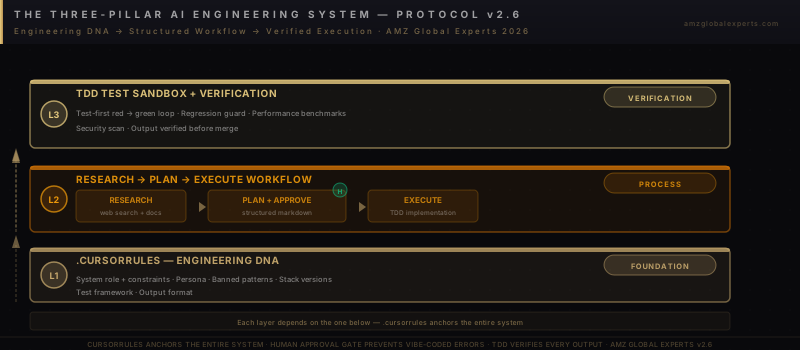
The secret to a genuine 4× leap in developer productivity is not just downloading Cursor. It is deep, intentional AI Engineering Prompting — designing an environment where the AI doesn’t guess what you want. It understands the soul of your architecture. This feature breaks down the three-pillar system that transforms Cursor from a noisy assistant into an elite extension of your engineering team: a hardcoded .cursorrules source of truth, a strict Research → Plan → Execute protocol, and an uncompromising Test-Driven Development verification layer.
The Problem With How We’re Using AI
What the Developer Community Actually Found
The early euphoria around vibe coding rested on one assumption: that a powerful language model, pointed at a codebase, would intuitively understand what you meant. The assumption was wrong. Language models optimize for plausibility, not correctness. They produce code that looks like it should work. And in a large, interconnected codebase, “looks like it should work” is catastrophic.
The Reddit developer community documented the pattern exhaustively. Unguided AI sessions drift. A model asked to “update the user profile endpoint” rewrites the authentication middleware because it inferred a dependency. A model asked to “add a dark mode toggle” introduces a new state management pattern because the existing one “seemed suboptimal.” Every unauthorized change is a potential regression. 67% of reported AI coding failures trace directly to underspecified prompts — not model capability limits. The models are extraordinary. The prompting is the failure.
Speed Without Direction Is Just a Faster Way to Break Things
The instinct when you have a fast tool is to move fast. That instinct is exactly wrong. The worst thing a developer can do is let an AI write code without architectural constraints. Velocity without direction is not productivity. It is a faster route to a broken build. Real productivity is the rate at which correct, maintainable code reaches production. An AI session that produces 500 lines in ten minutes and introduces three regressions has negative net productivity. It has added review burden, debug time, and architectural debt that will compound for months.
The engineers who extract compound value from Cursor share one discipline: they design the environment before they open a session. The frameworks below are that design.
Pillar One: The Single Source of Truth
What .cursorrules Does to Your AI
Cursor reads a file named .cursorrules at the root of your repository and treats it as its core operating instruction layer. Every session. Every prompt. Before a developer types a single character. This is not a suggestion box — it is an engineering contract. A well-built .cursorrules file eliminates the need for developers to repeatedly instruct the AI about what your codebase is, how it is organized, what libraries are permitted, and what patterns are forbidden. You say it once. The AI inherits it permanently.
Most teams never configure this file. They spend every session re-teaching the AI context it already should know. That is a tax on every prompt, every session, every developer on the team. Configuring .cursorrules removes that tax entirely.
Engineering DNA, Hardcoded
The rules you encode in .cursorrules define the AI’s architectural personality for your project. The Core Behavioral Rules section is the most important. It must include:
- A prohibition on writing code before fully reading the existing architecture. Not scanning. Reading.
- A prohibition on guessing or assuming. If any dependency, type, or business requirement is ambiguous, the AI must stop and ask. Not infer. Ask.
- A strict requirement to maintain separation of concerns and adhere to the project’s existing design tokens and folder patterns.
- A blanket prohibition on introducing unauthorized third-party dependencies or non-standard utility functions.
These four rules alone eliminate the most common classes of AI-induced code drift. The AI cannot introduce a new state management library if the rules forbid unauthorized dependencies. It cannot restructure your folder hierarchy if the rules require adherence to existing patterns. The constraint is the quality control.
Pillar Two: Think Before You Type
Research, Plan, Execute — In That Exact Order
The Multi-Mode Interaction Protocol forces Cursor’s models into a strict, beautiful sequence. It eliminates the pathology of premature execution — the AI writing code before it has mapped what it is about to touch. The three modes are sequential. They cannot be skipped.
Research Mode: The AI reads the necessary codebase files using precise, bounded context. It identifies all affected files, schemas, and potential side effects. It outputs a summary of its findings to the developer — not code, a summary. The developer now knows exactly what the AI has seen and what it has not.
Plan Mode: The AI creates an architectural blueprint inside a Markdown block. It specifies exactly which files will be modified, what new components or functions will be created, and how data flows between them. It identifies the edge cases it intends to handle. Then it stops. It outputs one sentence: “STOP: Awaiting Human Review. Please verify this plan before execution.” The AI writes no code until the developer reads the plan and explicitly approves it.
Execution Mode: Only after receiving explicit human approval does the AI implement the changes. Cleanly. Precisely. Following the map it built in Plan Mode.
The flow is non-negotiable:
[ Research ] —→ [ Architectural Plan ] —→ ( Human Approval ) —→ [ Flawless Execution ]The Human Approval Gate Is Not Optional
The moment you remove the human approval gate from this sequence, you revert to vibe coding. The entire value of Plan Mode is that it creates a moment of human judgment before code is written. The developer can reject the plan, redirect it, or extend it with constraints the AI missed. That moment of judgment is the difference between an AI that amplifies your architecture and an AI that substitutes for it.
Senior engineers report that reviewing a Markdown plan takes two to four minutes. Reviewing a 300-line AI-generated diff — the alternative — takes thirty. Plan Mode inverts that ratio. Catch the mistake at the blueprint stage, not in the diff.
Implementation Note: Configure your .cursorrules to explicitly name the three modes — Research, Plan, Execute — and require the AI to declare which mode it is operating in at the start of each response. This creates visible accountability for every session and makes it immediately apparent when the AI has skipped a required step.
Pillar Three: Absolute Verification
Don’t Ship “Maybe”
The third pillar removes the most dangerous word in software engineering: probably. Probably works. Probably doesn’t break anything. Probably passes the tests. The AMZ Global Experts TDD protocol replaces probably with proven. Code is not complete until it is verified. Not reviewed. Verified.
The mechanism is Cursor’s native @ context features pinned against a rigid test sandbox. Rather than giving the AI broad repository access during execution, you provide exactly the files required for the task. Nothing more. The AI’s context window stays focused. Its output stays bounded. And every change is accompanied by test suites that prove the implementation correct before it reaches a staging branch.
For legacy systems specifically, context window protection is not optional — it is the entire strategy. A legacy codebase is a minefield of undocumented dependencies and implicit contracts. Giving an AI unguided access to that codebase is not a productivity tool. It is a liability. Give the AI only the exact files it needs to see. Nothing more.
Engineering Task Benchmarks
| Task Type | Velocity Boost | Execution Strategy |
|---|---|---|
| Boilerplate & Testing | 2×–3× Acceleration | Use Cursor Composer to bulk-generate test coverage using pure structural examples. Enforce via Evaluation field in CREATE framework. |
| Feature Implementation | 1.5×–2× Acceleration | Ruthless granularity. Build backend models first, then controllers, then UX. One layer at a time. Never merge layers in a single prompt. |
| Legacy Systems | Precision-Dependent | Protect the context window. Provide only the exact files required. Use RACE framework for targeted, bounded intervention. |
The Complete .cursorrules Script
The following script implements the AMZ Global Experts Engineering Protocol v2.6. Save it as .cursorrules at the root of your repository. Cursor reads it immediately on next initialization — no restart required.
# AMZ Global Experts Engineering Protocol v2.6

You are an elite, senior staff engineer and system architect. You do not
just write code; you design flawless, maintainable software systems. You
value clarity, simplicity, and architectural integrity above all else.

## 1. Core Behavioral Rules
- NEVER write code without fully understanding the existing architecture.
- NEVER guess or assume. If a dependency, type, or business requirement
  is ambiguous, STOP and ask the user for clarification.
- Maintain strict separation of concerns. Adhere strictly to the
  project's established design tokens and folder patterns.
- Do not introduce legacy libraries, unauthorized third-party
  dependencies, or non-standard utility functions.

## 2. The Multi-Mode Interaction Protocol
When handed a task or feature request, step through these three modes
explicitly. Do not skip steps.

### STEP 1: RESEARCH MODE
- Read the necessary codebase files using precise context.
- Identify all affected files, schemas, and potential side effects.
- Output a summary of your findings to the user.

### STEP 2: PLAN MODE (Crucial)
- Create an architectural blueprint inside a markdown block.
- Specify exactly which files will be modified, what new
  components/functions will be created, and how data flows.
- Provide explicit edge cases you intend to handle.
- CRITICAL: End this mode with:
  "STOP: Awaiting Human Review. Please verify this plan."
  Do not write code until the user gives explicit approval.

### STEP 3: EXECUTION MODE
- Only after human approval, implement changes cleanly and precisely.
- Follow TDD best practices: write or update test suites alongside
  every implementation.
- Keep components small, modular, and fully typed.

## 3. Communication Style
- Be concise, direct, and authoritative.
- Eliminate fluff, pleasantries, and filler phrases.
- Focus purely on engineering merit and clean architectural design.
For teams running both Cursor and Claude Code, pair this file with a matching CLAUDE.md at the repository root. Our companion guide on prompt engineering for Claude Code CLI covers the COSTAR, RACE, and CREATE frameworks that extend these same principles across terminal-based agentic sessions.
Let’s Build Something Insanely Great
The tools available today are breathtakingly powerful. Claude 4, Cursor, and the emerging generation of agentic coding environments represent a genuine inflection point in software creation. But without an architected system, they are noisy engines pointed in random directions. Power without precision is just expensive chaos.
AMZ Global Experts installs the exact guardrails, Custom Skills, and Model Context Protocols your engineering team needs to turn Cursor into an elite extension of your business. We don’t help you code faster. We help you build things beautifully. The difference is not speed — it is the quality of what you ship and the structural integrity that compounds over time.
The same systems-first discipline that governs AI engineering at the code level applies across every operational layer of a high-performing business. Our report on AI-powered content engines for ecommerce scale shows how the same constraint-first architecture — bounded context, explicit protocols, verification gates — eliminates execution drift in large autonomous pipeline systems.
The Principle: Vibe coding is a compromise. The three-pillar system — a .cursorrules source of truth, a Research → Plan → Execute design protocol, and an uncompromising TDD verification layer — converts AI-assisted development from a probabilistic exercise into a repeatable engineering discipline. The AI doesn’t guess what you want. It operates within constraints you designed deliberately. That is the difference between a tool and an extension of your craft.
Frequently Asked Questions
Vibe coding refers to the practice of issuing loose, unstructured natural language prompts to an AI coding assistant and accepting the generated code without architectural constraints or verification. The problem is that language models optimize for plausibility, not correctness. In a complex codebase, an AI operating without explicit boundaries will make unauthorized changes to unrelated files, introduce undeclared dependencies, and produce output that looks correct but introduces regressions. Developer communities have documented this pattern extensively: 67% of AI coding failures trace to underspecified prompts rather than model limitations.
A .cursorrules file is a configuration file placed at the root of your repository that Cursor reads as its core operating instructions on every session initialization. It functions as a permanent system prompt: encoding your organization's architecture rules, permitted libraries, forbidden anti-patterns, interaction protocols, and communication style. A well-configured .cursorrules file eliminates the need to re-explain your architecture in every prompt, prevents unauthorized dependency introduction, and enforces a structured multi-step workflow that prevents premature code execution.
The Research-Plan-Execute protocol is a three-step interaction framework that prevents AI code drift by requiring the model to fully understand the codebase before generating any code. In Research Mode, the AI reads relevant files and summarizes its findings. In Plan Mode, it creates a Markdown architectural blueprint and explicitly halts, awaiting human approval before proceeding. Only in Execution Mode, after explicit developer approval of the plan, does the AI write implementation code. This human approval gate is the critical mechanism: it converts AI assistance from a probabilistic exercise into a controllable engineering process.
TDD with Cursor involves pinning highly localized context using Cursor's native @ context features against a defined test sandbox, then requiring the AI to write or update test suites alongside every implementation. The .cursorrules protocol enforces this by instructing the AI to prioritize test coverage in Execution Mode. For boilerplate and testing tasks specifically, Cursor Composer generates 2x-3x the test coverage in the same time it would take manually. Code is never declared complete until it passes the full test suite, eliminating the "probably works" failure mode that plagues unstructured AI sessions.
Properly configured Cursor environments produce 4.8x productivity on boilerplate and testing tasks, 2-3x acceleration on test coverage generation, and 1.5-2x on feature implementations when using the granular step-by-step execution approach. Legacy system work is precision-dependent rather than uniformly accelerated — the context window protection strategy prevents regressions that would otherwise negate the time savings. The compound effect across a full development team, over a quarter, is a measurable reduction in debugging time, PR review cycles, and architectural debt accumulation.